New Year 2027 AI Video Generator
Also called: 2027 New Year AI Trend, Welcome 2027 AI, Goodbye 2026 Welcome 2027, 2027 Marble Numbers AI, Happy New Year 2027 AI, 2027 Mountain Summit AI
Turn one photo of an adult or a pet into the New Year 2027 clip: you climb four giant marble digits on a mountain peak, stand up with open arms, and the camera pulls back like a drone to reveal 2027. Six seconds, 9:16 or 16:9, with bonus previews in every pack.
No free preview right now: the full 6s HD video starts at $8.99. · 9:16 or 16:9 · Full video, no watermark · No subscription
Make my video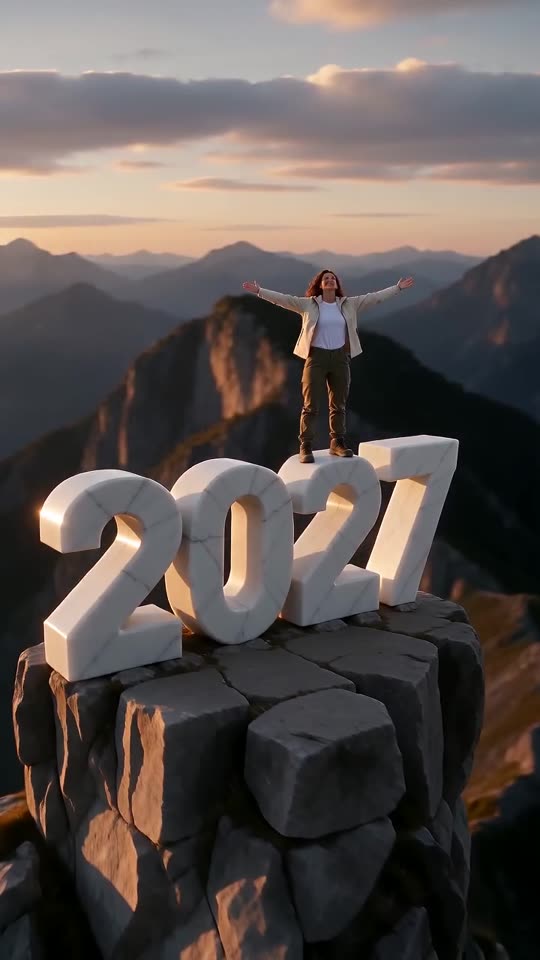 Made with MimicZip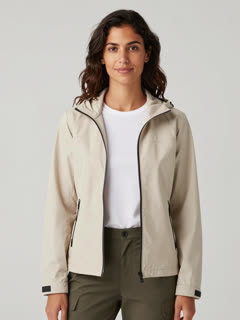
Example frame. Your video uses your own photo.
See the 2027 reveal
This clip was made with MimicZip from an AI-generated photo of a fictional adult. Your result follows your own photo, so it will look different.
- Made with MimicZip
A woman in a beige jacket stands on top of 2027
A fictional woman with wavy dark hair and a beige hiking jacket climbs the side of four giant white marble digits at sunset, rises to stand on top with her arms open, and the camera pulls back to show 2027 on a rock pillar. The input photo is AI-generated and the clip is 6 seconds in 9:16.
Light: Golden sunset · Place: Mountain summit · Digits made of: White marble · Outfit: Clothes from my photo
Inputs6s · 720p · AI-generated audio · Made 2026-10-31
Generated with MimicZip
AI-generated soundtrack with no voices; it differs between runs. Not the original sound.
Example people are fictional.
Unlike sites that use videos downloaded from TikTok as their examples, every example here was made on MimicZip from a single photo — what you see is what our generator actually produced.
Examples are shown for illustration, not as a promise of identical output. Faces, motion and sound change with your photo.
The trend, explained
What is the New Year 2027 AI trend?
The New Year 2027 clip is a countdown-season AI video. A person climbs the side of four enormous white marble digits that spell 2027 on top of a mountain peak, pulls themselves up, stands with both arms open to the sunset, and the camera rises and pulls back like a drone until the whole number is in view. It is the follow-up to last year's "goodbye 2025, welcome 2026" version of the same idea.
The first 2027 post came from @c0pe6zs0b9 on 27 October 2026, and the clip we follow is its first 6 seconds; the rest of that post is a tutorial. On 28 October @user4947097136093 posted a French "goodbye 2026, welcome 2027" version in which a 6 falls away and a 7 takes its place, labelled as AI-generated by TikTok, which reached about 212,600 views. Last year's Spanish tutorial by @lahmr60574583 reached about 1.4 million views. Posts often point to a CapCut template. Counts were read on 31 October 2026 and not audited.
MimicZip makes your own version from one photo of an adult or a pet, in 6 seconds. The mountain, the sky and the four digits are generated new, and the reference we use is blurred and only guides the camera and the timing. The sound of the original posts is not in the video. This is an internet trend, and MimicZip has no link to the accounts that posted it.
Read more: The clip we follow (@c0pe6zs0b9) · The French version (@user4947097136093)
Where this trend comes from
The clip we follow
@c0pe6zs0b9 · TikTok · Oct 27, 2026 · 4.8K views — The first 2027 version, and the clip we follow: a person climbs a giant white marble 2027 on a mountain peak, stands up, opens their arms and the camera pulls back to show all four digits. Our video matches the first 6 seconds of this 28-second post, which goes on with a tutorial- @user4947097136093 · TikTok · Oct 28, 2026 · 212.6K views — A French "goodbye 2026, welcome 2027" version, labelled as AI-generated by the creator, where a 6 falls away and a 7 takes its place. It is the post that started to take off
- @lahmr60574583 · TikTok · Nov 18, 2025 · 1.4M views — Tutorial for last year's version of the idea, "goodbye 2025, welcome 2026" in Spanish
Links open the original posts. MimicZip is not affiliated with these creators.
What happens in a New Year 2027 video
A 6-second video is one continuous shot. Timings are approximate, and the 5-second preview runs the same beats faster.
01 · 0–2s
The climb
A low, close shot: you grip the huge side of a marble digit with your hands and feet and pull yourself upward, wind in your hair.
02 · 2–3s
Over the top
You heave over the top edge and rise to standing on the digits, small against a glowing sky.
03 · 3–4.5s
Arms wide
You stand tall and steady, open both arms to the sky and look out, with the whole horizon behind you.
04 · 4.5–6s
The reveal
The camera rises and pulls straight back like a drone until all four digits, 2027, stand in a row on the rock pillar with you tiny on top.
Your photo decides who stands there. The climb, the open arms and the pull-back are fixed, and every result comes out a little different.
How to add a sound to your New Year 2027 AI video in TikTok
Pick the song inside TikTok when you post, then turn the video's own sound down.Show the full how-to
Our video has an AI-made instrumental track with warm strings, wind and a soft stone rumble, and it is not timed to any song. The posts we follow use their own voice-overs, so there is no single trend sound to match. Pick an uplifting sound in TikTok, or download a silent version from My videos.
- In TikTok, tap Add sound and search for an uplifting, cinematic or countdown sound you like, then tap Use this sound.
- Tap Upload and pick the video you downloaded from us.
- Open Volume and turn the video's own sound down to 0, or download the silent version from My videos.
- Slide the sound left or right until its swell meets the start of the pull-back, at about 4.5 seconds, trim it to the length of the video and post.

Need to move where the sound starts? This short video shows how to trim it.

Video: How To Trim Sound On TikTok 2026 (Very Easy) by Software Solutions on YouTube
How to make a New Year 2027 video in 3 steps
No filming, no prompts and no editing app.
Add your photo
Upload one clear photo of an adult or a pet, with the face and the upper body in view. JPG, PNG or WebP, up to 10 MB.
Build your summit
Pick 9:16 or 16:9, then the light, the place, the material of the digits and the outfit, or keep the defaults. Tick the photo-consent box and log in. Every pack includes bonus 5-second previews.
Make the full video
Spend 1 credit on a 6-second 720p video. Download it, then add a sound of your choice in TikTok.
Which photo works?
One photo is required: the climber. It shows one adult or one pet, face toward the camera with the eyes open, and the head and upper body in view. A photo that also shows the clothes helps, because you are seen from the side and from far away for most of the clip.
Works well
- A clear, well-lit photo of one adult or one pet, face toward the camera
- Head and upper body in the frame, eyes open
- JPG, PNG or WebP, up to 10 MB
- Between 300 and 6000 pixels on each side
Avoid
- Babies, children or anyone under 18
- Two or more people in one photo, sunglasses, masks or heavy filters
- Toys and drawings: the template takes an adult or a real pet
- Celebrities, anyone who has not agreed, or a screenshot of someone else's clip
Limits: width-to-height ratio between 0.4 and 2.5. Upload only subjects you own or have permission to use.
Ways to play it
The classic marble
White marble digits on a mountain peak at sunset.
Fireworks night
A dark blue sky with golden fireworks far below.
Gold or neon digits
Swap the stone for polished gold or glowing neon tubes.
A cliff by the sea
Stand on the 2027 above the waves instead of the mountains.
Why people use it
Four digits that read 2027
The number is written into the scene, so the finished clip ends on a clear, correct 2027.
Six kinds of light
Sunset, sunrise, a night with fireworks, snowy dawn, starry sky or blue hour.
Five places, five materials
A summit, sea cliff, rooftop, dune or cloud pinnacle, with marble, gold, ice, neon or flowers.
Bonus previews in every pack
Check the face and the digits before you spend a credit.
No subscription
Buy credits once. They never expire.
Works on your phone
Pick a photo from your camera roll and download a tall or wide video for TikTok, Reels or Shorts.
New Year 2027 AI: frequently asked questions
What is the New Year 2027 AI trend?
A short AI clip for the end of the year: a person climbs giant marble digits reading 2027 on a mountain, stands up with open arms, and the camera pulls back to show the whole number. The explainer guide has the timeline.
How do I make the New Year 2027 video with my photo?
Upload one photo of an adult or a pet, pick the light, place, material and outfit or keep the defaults, check your photo with a 5-second bonus preview, then make the full 6-second 720p video for 1 credit. There is no prompt to write. The how-to guide covers each step.
Can I try it for free?
Not at the moment. MimicZip has no free tier or free preview; one full 6-second 720p video costs 1 credit, and packs start at $8.99. Every pack includes bonus watch-only previews so you can check your photo before spending a credit. There is no subscription, and the full video has no watermark.
Will the digits really say 2027?
That is what the template is built for: the scene asks for four giant digits reading 2027, left to right. Generated images can slip, so check the last second of a bonus preview, where the digits are sharpest and largest.
Which sound does the New Year 2027 trend use?
There is no single trend song: each post uses its own voice-over or original sound. We include none of them and our video is not timed to a song. The sound guide says how to add a sound.
Is the sound in my video?
Our video comes with new AI-made music, wind and a soft stone rumble, never the original recording and with no voices. You add the sound you like inside TikTok, where it is licensed. A silent download is available.
Is this connected to CapCut or the accounts that posted it?
Posts about the trend often point to a CapCut template. MimicZip is an independent template tool: your video is generated from your own photo and is not made, endorsed or licensed by CapCut, TikTok or the accounts that posted the trend.
Can I use a photo of my pet?
Yes. A pet climbs and stands in a way that suits its body, raising both front paws in place of open arms. The example here uses an adult; pets follow the same script but were not tested on this page.
More questions (6)
Does the video have a watermark?
The full 6-second 720p video has no watermark. Only a preview carries a PREVIEW badge, and the preview cannot be downloaded.
Can I change the light, the place or the material?
Yes. Light: sunset (the default), sunrise, fireworks night, snowy dawn, starry sky or blue hour. Places: mountain summit, sea cliff, city rooftop, desert dune or above the clouds. Digits: white marble (the default), gold, ice, neon or flowers. Outfits: your own, hiking gear, a winter parka, evening wear, white linen or sportswear. The camera and the timing stay the same.
Is there a CapCut template for New Year 2027?
Yes, posts about the trend point to CapCut templates. A template works inside its own app, while MimicZip needs one photo on the web and gives a finished 6-second video with bonus previews in every pack. The comparison explains when each one fits.
Do I have to write a prompt?
No. New Year 2027 is a fixed template, so there is no prompt box: you add a photo and pick the light, place, material, outfit and video shape. Prefer your own tool? Copy the ready-made prompt from the Kling prompt page.
What if a video fails, and how long are my photos kept?
A failed generation returns its credit automatically, and unused packs can be refunded within 7 days; see the refund policy. Photos are stored privately and deleted automatically 14 days after upload.
Were the New Year 2027 examples really made on MimicZip?
Yes, the example went through the MimicZip generator, starting from the input photo you see on the card. That starting photo is AI-made and does not show a real person. We never use another creator's video as an example. Yours will follow your photo, so expect different details.
Updated:
Ready to climb the 2027?
One photo, a bonus preview with every pack, then your own New Year 2027 video.
Make my videoYour photo. Your 2027.
6-second HD video from $8.99. No subscription, no watermark.
Questions? Email support@mimiczip.com.
MimicZip is an independent AI tool. New Year 2027 is an internet trend name: MimicZip is not affiliated with or endorsed by the accounts that posted the trend, TikTok or CapCut. Videos are AI-generated.